Bill through outages
Keep the counter moving when Wi-Fi or mobile broadband drops. No paper tickets, no waiting for connection to return.

Desktop POS
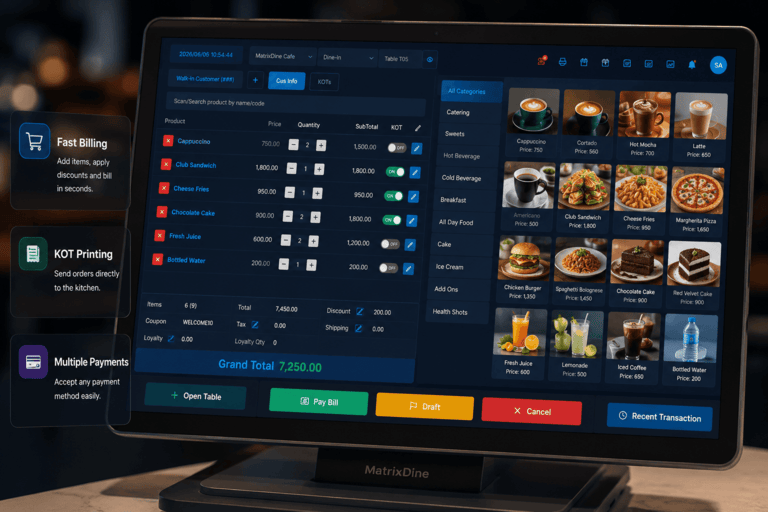
MatrixDine desktop POS for Windows keeps your counter billing through Wi-Fi outages. Sync menu, prices, and inventory at day start, then upload sales automatically when connection returns.
Why desktop POS
Keep counters running, stock accurate, and reports up to date - even when connectivity is unreliable.
Keep the counter moving when Wi-Fi or mobile broadband drops. No paper tickets, no waiting for connection to return.
Pull the latest menu, prices, and stock to your Windows counter every morning before you open.
Completed sales and stock changes upload when internet is back - your dashboard and reports stay current.
How it works
Four steps that keep billing running and your dashboard up to date.
Sync menu, prices, and inventory from the cloud to your Windows POS before service opens.
Take orders, print receipts, and send kitchen tickets locally - even with no internet connection.
When connection returns, completed sales and stock movements upload to the cloud automatically.
Branch reports, inventory, and multi-outlet views stay aligned once data is synced.
What syncs
What moves between your Windows counter and the MatrixDine dashboard at each stage of the day.
Before service opens, the latest outlet data is downloaded to your Windows counter.
Billing runs on the desktop app even with no internet connection.
Completed transactions upload automatically when connectivity returns.
Your counter and MatrixDine dashboard reflect the same outlet once synced.
Built for
FAQ
Yes. The MatrixDine Windows desktop app continues billing offline - orders, payments, receipts, and kitchen tickets keep flowing locally until your connection returns.
Windows only. Install it on your counter PC or Windows touchscreen terminal at the billing desk.
Billing continues on the desktop app. Orders, payments, receipts, and kitchen tickets keep flowing locally. When your connection returns, sales sync to the cloud automatically.
Before you open, the desktop app pulls the latest menu, prices, inventory, and outlet settings from the cloud so your counter starts with accurate data for the day.
Yes. It is live and available for all clients - not a limited pilot. Contact us to enable it for your outlet or include it in your onboarding.
You need internet for day-start sync and to upload sales to the cloud dashboard. During service, billing can run fully offline on Windows. Once you reconnect, sync happens automatically.
Get started
The desktop POS app is available for all MatrixDine clients on Windows. Book a demo and we will walk you through setup, day-start sync, and offline billing on your counter.
Mention your outlet name, number of Windows counters, and whether you need help with day-start sync setup.